
Canon PowerShot SX10 IS. Photograph from Wikimedia Commons .
This is a page about how I take my pictures, get them onto my computers, modify them, and eventually store them. I expect this page to be updated more in the future as I learn more about photography and darktable.
I am still learning photography, so I am definitely not an expert. A lot of this is just what I have learned from experimenting with my own pictures.
The camera I currently have is a Canon PowerShot SX10 IS. It's also a camera that my dad used a lot and mastered. Cool enough, he made a lot of really nice pictures even though it's a fairly simple camera.
It is an older digital camera with a 10 megapixel CCD sensor and a 20x optical zoom. I like the way the pictures can look, especially when there is some noise in them.
I have been experimenting with making pictures look grainy and retro, but I am learning pretty quickly that this can go wrong.
Canon PowerShot SX10 IS. Photograph from
Wikimedia Commons
.
Here is an example of a picture taken with the same camera.

"Mountain Landscape And The Road In Winter", taken with a
Canon PowerShot SX10 IS.
Wikimedia Commons
.
I try to prioritize doing things right the first time.
That is especially important if I am trying to make a picture look grainy. If it works, it can look really cool. If it does not work, though, I can end up with an extremely grainy picture that is basically impossible to save.
There is a higher risk/reward ratio when I start messing with things like this, so I need more patience and I need to actually think about the picture before I take it.
Once I am done taking pictures, I take the SD card out of the camera and put it into my Arch GNU/Linux laptop.
I do this because my Lenovo IdeaPad has an SD card slot. My Mint GNU/Linux computer does not have one, and I do not have an adapter, so the Arch computer is currently the easiest way for me to get the pictures off the camera.
I copy the JPEGs onto the computer so I have the original files before I start modifying anything.
The program I use to modify the pictures is darktable .
I discovered it fairly recently, and I have been having fun learning how it works. It is free software too, which is another reason I like it.
I can work on my pictures on either computer, depending on which one I am using.

darktable 4.4.2. Screenshot from
Wikimedia Commons
.
Since my camera takes JPEGs, the camera has already done some processing before I even open the picture in darktable. Because of that, I try not to go completely insane with the editing afterwards.
I think this is one of the most important things I'm learning so far.
It is very easy to see a slider in darktable and think: "what happens if I turn this way up?"
Sometimes it turns out looking nice.
Or, it comes out looking quite bad.
Noise is a good example. I can try to reduce noise afterwards, but if I took a picture at a very high ISO and it is already extremely grainy, there may not be much I can do.
I had a picture like this recently. I tried to work around it, but eventually I realised that it was basically impossible to make better.
Oh well. There are other good pictures.
This is why I would rather get the important parts right when I am actually taking the photograph.
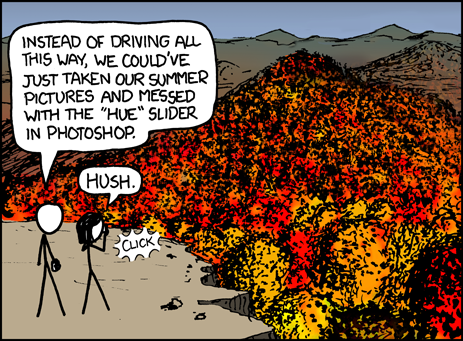
"Fall Foliage" by xkcd.
View the original comic
.
This is basically the sort of thing I mean. It is easy to think that you can just fix everything afterwards, but sometimes it is better to actually go somewhere and take a good picture in the first place.
Another thing I have been thinking about is what I am actually photographing.
A cool editing style does not magically make a boring picture interesting.
I would much rather take pictures of friends, funny things, cool cars, interesting buildings, strange objects, and things like that.
This is probably what I am looking forward to the most. I want to actually go outside and find things worth photographing.
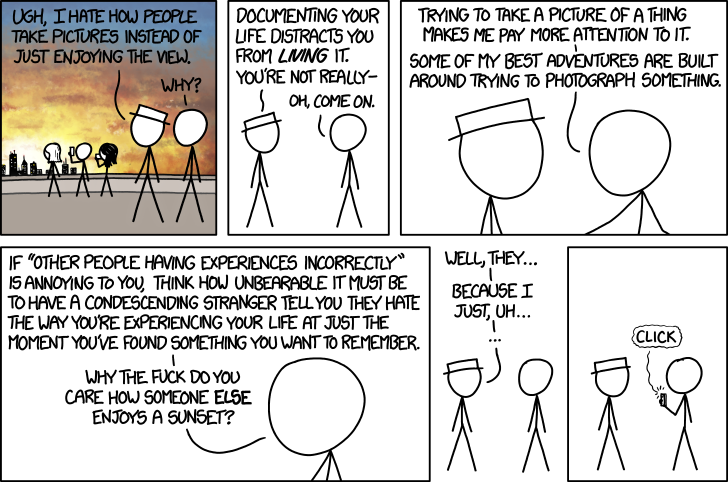
"Photos" by xkcd.
View the original comic
.
I like the idea from this comic: taking a picture of something can make something more memorable.
On the other hand, taking a picture of my backyard because I am too lazy to go outside is probably what gets people bored the most.
A retro-looking picture of a cool sports car, however...

Ferrari Testarossa photograph by Clemens Vasters.
Wikimedia Commons
.
That is the sort of thing I mean.
I think the retro look works a lot better when the subject itself is interesting.
I especially want to get more pictures of my friends.
Those are the sorts of pictures that can become really nice to keep even if they are not technically perfect. Years later, the picture can still remind you of what was happening at the time.
I would much rather have a slightly grainy photograph of a funny moment with friends than a technically perfect photograph of some random object.
Not every picture I take is going to be good.
Some will be blurry, some will be too dark, some will have too much noise, and some will just be boring.
That is fine.
If a picture can be improved, I will work on it. If it cannot really be saved, I would rather move on and take another picture.
I do not think every picture has to be kept just because I took it.
When I have a nice selection of pictures that I have made, especially pictures involving friends, I like to burn them to a CD.
I can store the CD somewhere, or give it to somebody else, which is always pretty fun.
There is something nice about having an actual disc with a collection of pictures that I made myself.

A blank CD-R. Photograph by Bwmoll3.
Wikimedia Commons
.
Licensed under CC BY-SA 3.0 / GFDL.
Right now I am mostly trying to learn when a picture needs editing, when I should take a completely different photograph, and when I should just leave it alone.
I also want to get better at using the camera itself. I think it is much better to take a good photograph in the first place than to depend on darktable to rescue everything afterwards.
The grainy retro look is still fun, though. I just need to learn when it actually works.
I think it will be especially rewarding once I start taking more pictures of genuinely interesting things and figure out how to make the camera and the editing work together.
This page will probably get longer as I learn more.
I might eventually add specific darktable techniques, examples of my own pictures, before-and-after examples, information about noise reduction, colour correction, sharpening, and other things I try.
For now, this is basically how I do things.


.jpg)
